Back Orders
What are they?
Backorders are orders used to ship material that did not ship on the original order.
In GrowPoint, a backorder can be created from any order that is not fully shipped, is marked 'Ready to Post', and has not already been backordered.
How do they work?
The backorder routine is run from the menu by clicking Accounts Receivable > Activities > Back Orders.
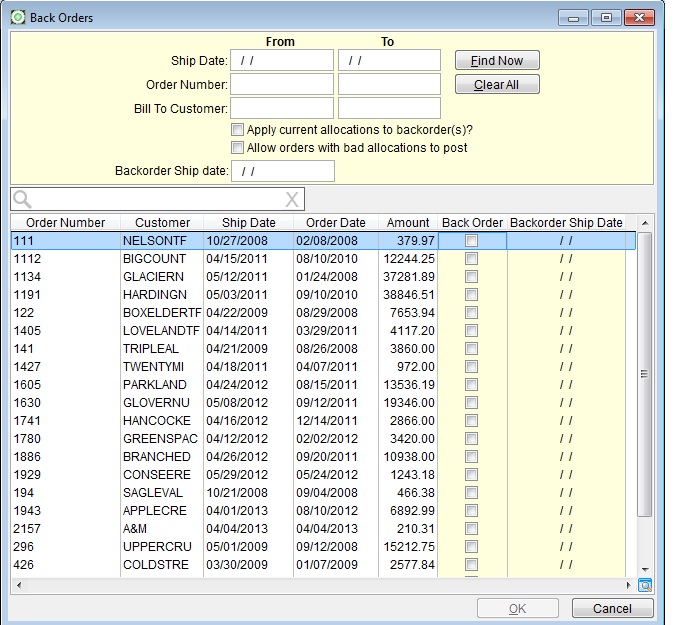
Specific orders may be searched for by entering a Ship Date range, Order Number range, a range of Bill To Customers, or leave the Search Criteria empty and press Find Now to show every order currently available to be backordered.
 November 2013 - The order number will fill in automatically with the currently selected sales order on the sales order form, if it is open and a sales order is selected.
The options above the grid are important to understand:
Apply current allocations to backorder(s)
Checking this option will automatically allocate the newly created backorder to whichever locations are currently in use by the selected order.
Allow orderw with bad allocations to post
This is the same option used on the Posting form.
Creating a back order will post the original order to the inventory. This must happen to keep the availability correct. If the order has a bad allocation, a back order cannot be created without this option checked.
Backorder Ship date
A date entered in this field will become the ship date of each new backorder created.
It is not necessary to enter a date here as each order may have a unique
date entered directly in the grid. Or the date can be left blank
and the back order will be created without a ship date and can be filled
in later.
Select the order(s) you wish to backorder by checking the box in the column labeled 'Back Order' and press 'OK'.
What happens next?
The backorder process will create a new Sales Order. Depending on your AR options setup the order number might be a new number or it might be the original number,an asteric, and some more numbers sequentialy indicating how many backorders have been created. The reference number of the new sales order will always be the original order number.
Any item that was not fully shipped on the original order will be placed on the backorder with a quantity of what did not ship on the original order.
After the backorder is created, it is an independent order. It can be edited and manipulated just as any other order saved in the database. It contains a reference to the original order but is not linked to the original in any way. It can even be deleted.
The original order is marked as having been backordered and may not be backordered again. Even if the backorder is deleted the original order may not be backordered again.
If an order has been backordered, the title bar across the top of the
Sales Order screen will display a message stating as such.