GrowPoint grids are functional
The grids in growpoint are just like the grids in BAS. The columns may be resized and rearranged.Unlike BAS, the grids in GrowPoint are also sortable, searchable, filterable, printable, exportable, and more dependable.
The new Grids
Not all the grids in GrowPoint have been updated at this time. Even the ones that have been updated are not noticable to most users.
Take a look at this grid from the Sales Order Fast Entry:
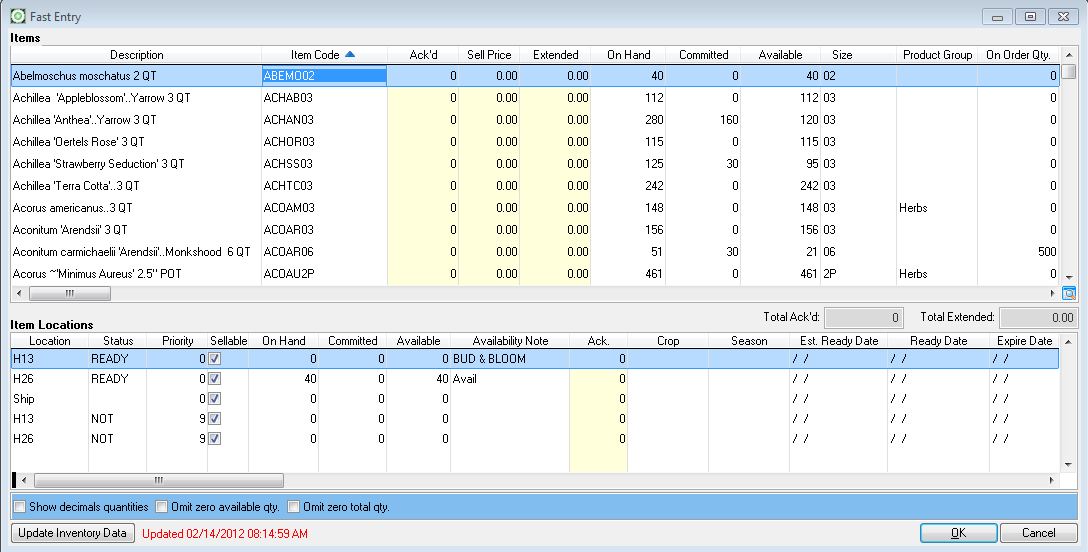
Notice anything different? This is the new grid. You can tell by the small magnifying glass in the lower right corner.

How is it Different?
Every column is sortable. By double clicking on the column header the column will alternately sort ascending, descending, and back to no sort each time you double click. The column header will display a triangle to visually alert you that the entire grid is sorted on this column.

The grid may be sorted on only one column at a time.
Every Column is filterable. Right clicking on a column header will open the filter selection.

A list showing each unique value currently in that column is displayed. Choose as many or as few values as you want and click the Filter button. The entire grid will be filtered to show only records having the selected values in this column. The column header will display a funnel

to visually alert you that a filter has been set on this column. You may filter as many columns as you want. Keep in mind that each successive column will have fewer unique values as the grid has already been filtered.
The entire grid is printable and exportable. Once you have the grid filtered and sorted the way you like, press the magnifying glass in the lower right corner. This opens the Grid Templates & Columns dialog.

Click on either Excel Export or Printer Preview to export or print respectively.
Templates can be created and reused.If you find that you routinely sort and filter the grid the same way you can set up a template and use it each time you want use the grid. Once you have the grid filtered and sorted the way you like, click the magnifying glass to open the Grid Templates & columns screen pictured above. Click the green "+" to add a new template. Give it a name. The next time you need to filter and sort the grid like this you can select the template from the drop down and save yourself some time.
- Templates are created per grid. Meaning the template you enter on the Sales Order Fast Entry grid is not available on the Master Order fast entry grid.
- Saved templates cannot be edited. I you want to change a saved template you must delete it and make a new one.
- There is no limit to the number of templates you may have per grid.
 for 2016!!
Removed Column Search - This was the search that was found via right click and then had to enter stuff to search. The grid search is better.
Export to Excel now export a normal looking date format. Column titles have underscore between words so export will export the entire name and not just the first word. If Excel is installed it will open the exported spreadsheet automatically.