Accounts Receivable - Setup
Setup
The A/R setup tabs (screens) are where you begin building the criteria that defines the Accounts Receivable module. The Maintenance Setup componente is used to build information in the A/R module and set the paramteters for other entry such as customers, orders, payments, credits, etc. The A/R setup is access from the menu via Accounts Receivable > Maintenance > Setup.
The A/R Setup has 8 pages (top row of tabs) and 7 sub pages (bottom row of tabs) that are accessible when on the Lookups tab.

Lookups
The A/R Lookups tab is used to configure the system components to be attached to your customer records and other transactions in the accounts receivable module. The lookup tab has sub-tabs for entering the following infomation: Terms, Customer Types, Sales Tax, Sales Personnel, General Messages, FOB, Payment Methods, and Credit Reasons.
Terms
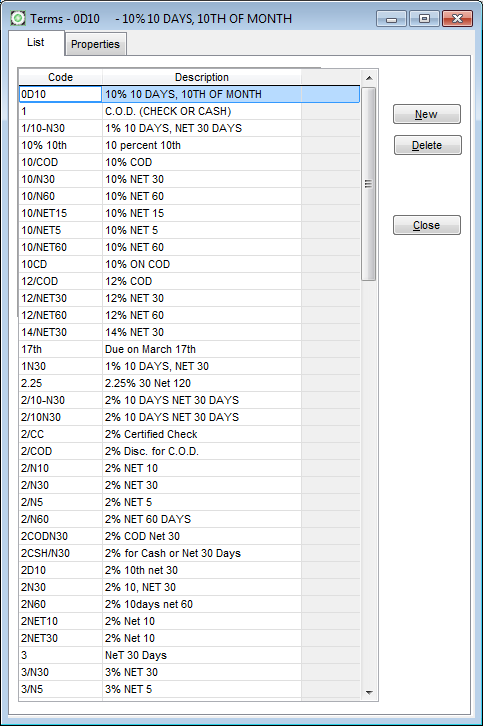
When items are sold to a customer, there are usually predefined conditions indicating when a customer is expected to pay for the purchase. If a customer is a cas customer, the terms are usually COD or Cash On Delivery. If a customer is extended credit, the terms of the sale may be Net 30 days giving the cusotmer 30 days from the ship date to pay before being considered past due.
Sometimes a customer is given incentive to pay before the due date. In this situation the terms of the sale are set up for a customer to receive a discount if the invoice balance is paid early. When early pay terms are used, the customer has a choice when to pay the invoice. If the invoice is paid before the due date, they receive a discount. If the invoice isn't paid before the due date, they must pay the full invoice balance.
A terms discount is different from a discount that is given to the customer on a sales order. When a customer chooses to pay off an invoice before its due date, they are taking a discount to reward themselves for early payment. When you give a customer a discount just for doing business with you, you are giving the customer a discount, regardless of when the pay the invoice.
Use the Terms tab to setup customer payment discounts. There is no limit to the number of discounts you can set up in GrowPoint. Each discount is given a unique code to identify it. Terms codes are attached to customer records and automatically appear on sales orders for that customer. When a sales order is entered, the default terms may be changed depending on the terms of the order. To add a new Terms Code, press the Add Item Button and a blank record is inserted into the Terms table.
Terms Properties
Code
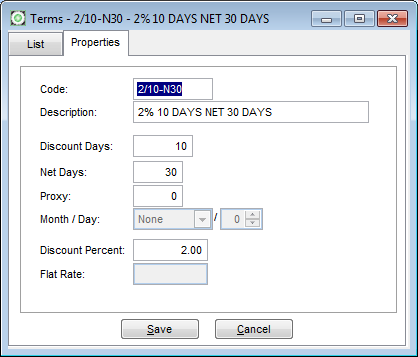
Enter up to ten (10) characters or numbers to create a code identifying a term as seen in the images above and below.Description
The description entered for the terms code appears on invoices and acknowledgment forms.Discount Days
If the terms of a sale allow an early payment discount, enter the number of days from the invoice ship date date the invoice must be paid to qualify for the discount. In the above example, a 2% discount may be taken if the invoice is paid within 10 days.Net Days
The number of days before the invoice is considered past due if not paid in full. The above example shows the invoice will be due in 30 days. After that it is considered past due.
Proxy
A value here will make this termscode a proxy term. A proxy term is on that has a set due date such as the 15th. This means the due date of the invoice is the 15th of the next calendar month. If the invoice is dated any time in June, for example, the due date will be July 15th. The proxy field is disabled until you tab through the Net Days and leave it empty. Entering a proxy value will disable the Net Days field as the two are mutually exclusive - you can only use one or the other, not both.
Month / Day
The Month / Day field allows for a specific month and day to be entered that will be the due date. If this field is used then the term is complete as long as it has a code. A month / day term is just simply a due date that will be the next occurence of that date. If the term if setup with March 17 as the due date then any invoice with that term will have the due date as Mar 17th regardless of the invoice date. If the the invoice is dated March 16th the due date is tomorrow, if the invoice is dated March 17th or later then the due date will be March 17th of the following year.
Discount Percent
Enter the discount percent (2 = 2%, 1.5 = 1.5%) the customer may deduct if they pay within the terms Discount Days entered earlier. For a term offering 2% 10 Days the Discount days would be 10 and the Discount Percent would be 2. Then if the customer pays the invoice in full within 10 days of receipt they may deduct 2% of the invoice amount. A terms discount message is available as an option for the invoice. If selected, a Message stating "You may deduct x if the invoice is paid in full by mm/dd/yyyy" where x is the amount they may deduct - already calculated by multiplying the terms discount percent by the invoice totla - and mm/dd/yyyy is the date which is the ship date plus the number of days in the Term Discount Days field.
Flat Rate
Perhaps the easiest term of them all. This is simply a percent that will reduce the amount owed when the customer pays. It is a way of giving your customer a disounted price on their purchase but it is taken at the time of payment rather than at the time of delivery.