General Ledger - Chart of Accounts
Creating a Chart of Accounts Master File
To set up the Chart of Accounts, choose GENERAL LEDGER > MAINTENANCE >CHART OF ACCOUNTS.
To edit an account or view the information click the properties tab or double click on the account.
Remember, you can re-sort these lists alphabetically by clicking on the heading. |
|
Click on New to add an account |
|
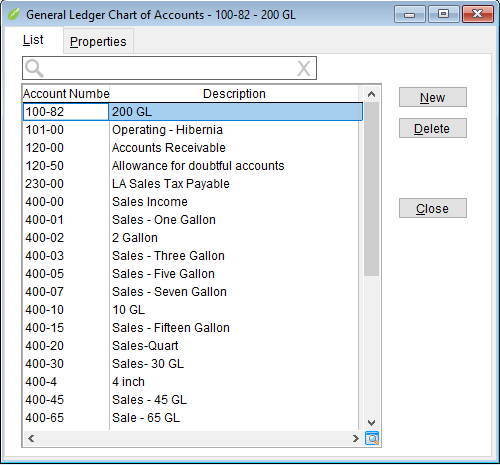
- New
- Click this button to add a new account. The Properties tab will open with a blank record.
- Delete
- You will only want to delete accounts that have never been used. The system will not allow you to delete an account that has been used. Instead, go to the properties tab and click the closed flag.
- Close
- Click to close the Chart of Accounts form.
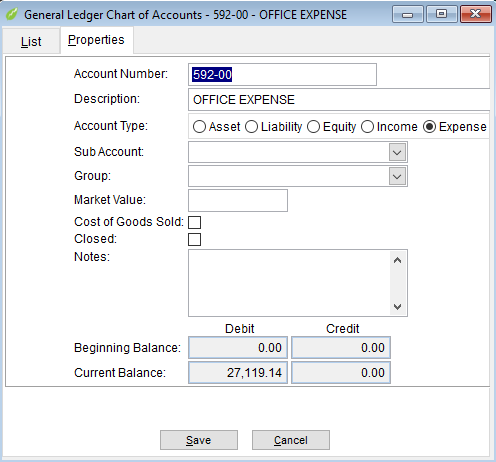
- Properties
- Click on Properties to see or edit details about an account.
- Account Number - shows the selected account number. It can be changed if it hasn't been used.
- Description - A description of the account or an account name.
- Account Type - This is very important as it determines whether entries will be debits or credits as well as where it will print on reports such as P&L and Balance Sheet.
- Sub-Account - optional. An account may be declared as as sub - account and print on the reports grouped together. An account must exist before it can be selected as a sub account.
- Group - Optional. Another grouping feature.
- Market Value - optional.
- Cost of Goods Sold - Check to identify this account as a cost of goods account.
- Closed - Check this box if you no longer use it and don't want it to show on reports.
- Notes - add notes here to help explain what the account is and how to use it.
- Beginning Balance - Will show the opening balance of the account when it was created.
- Current Balance - Shows the current GL account balance by summing all posted transactions.
Related Articles