General Ledger - Checkbooks
Checkbooks
Use this component to setup bank checking account(s). Any number of accounts may be entered. Bank accounts setup in other modules (payroll or accounts payable) will be on the List tab, and no other action is necessary. One bank account may be used for accounts payable, payroll, and GL. Each bank account activity is viewed either through the Check Register from the Print Reports menu, or by general ledger reports listing entries for the GL account assigned to the checkbook.
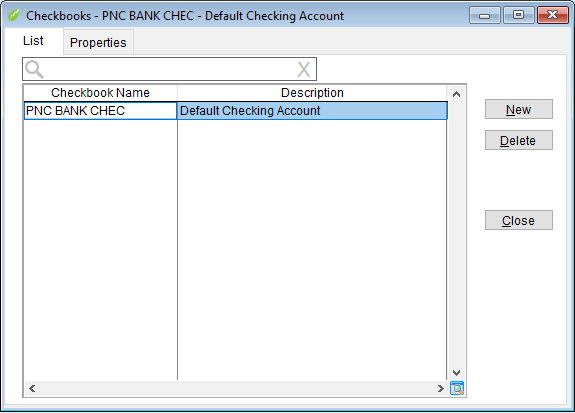
The form opens to the List tab. All existing checkboods show here. You can edit a checkbook by double clicking on it. A new checkbook can be created or an existing one deleted by selecting it then clicking Delete button.
Add a New Checkbook or Edit an Existing one
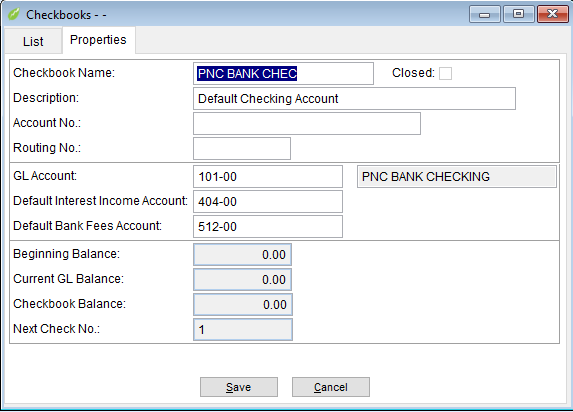
- Enter Checkbook name up to 25 alphanumeric characters.
- Enter Description up to 50 alphanumeric characters.
- Optional entry of bank account number and routing numbers.
- Right click on GL Account field to bring up GL Account Lookup window. Highlight the GL Account for this checkbook and click OK. (Skip if not using General Ledger Module.)
- Repeat process for Default Interest Income Account and Default Bank Fees Account. The default interest income account and default bank fees account are used when reconciling the checkbook.
- Greyed fields are for information only and may not be changed in this component.
- Click Save to return to List tab.
- Click Close to exit.
Related Articles