General Ledger - Setup
Before using the General Ledger, or anything that will post to the General Ledger, you need to define how it will be used. Do this by clicking on the General Ledger > Maintenance menu. The three areas that are required are Setup, Chart of Accounts, and Periods. The other areas of General Ledger are optional.
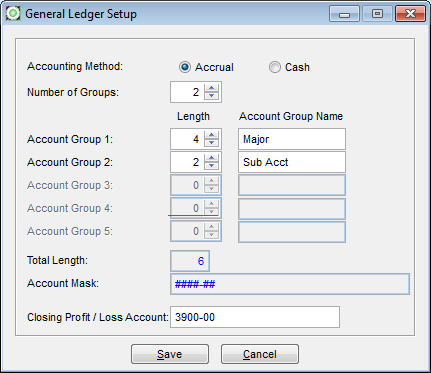
- Accounting Method
- Choose Accrual. Even if you report as Cash, you most likely run on accrual. If you truly do run your business on a Cash basis choose Cash. Doing so will not allow you to owe money in Accounts Payable nor be owed money in Accounts Receivable. A Cash business does not have Receivables and Payables.
- Number of Groups
- This field needs to be at least 1 to indicate there is one group of numbers for the Chart of Accounts. If you are choosing to have multiple sets of books or break out cost centers, here is where you will indicate how many break outs. For just one cost center or sub group, you would eneter 2 as the number of groups. Also if you want to print a cash flow report, set up an extra group of two to allow you to assign a cash flow code to it so you can print reports specifically by that order.
- Account Groups
- Enter the number of characters you want of the account number to be use for this group followed by the description describing the specific portion of the account number. Repeat this for each group or division of the account number.
- Total Length
- The value in this field is the total lenth of your account numbers as you have defined above. You could have 1 digit account numbers but our suggested minimum account number length is 2. The maximumn allowed is 25.
- Account Mask
- This is a visual representation of what your account numbers will look like.
- Closing Profit/Loss Account
- You need to come back to this one after you have setup your Chart of Accounts. Be sure when doing so that you include a closing account to use. This is the account that will be used to offset the closing entries when you perform Year End Closing.
Related Articles