General Ledger - Fiscal Periods
Maintenance>General Ledger>Periods
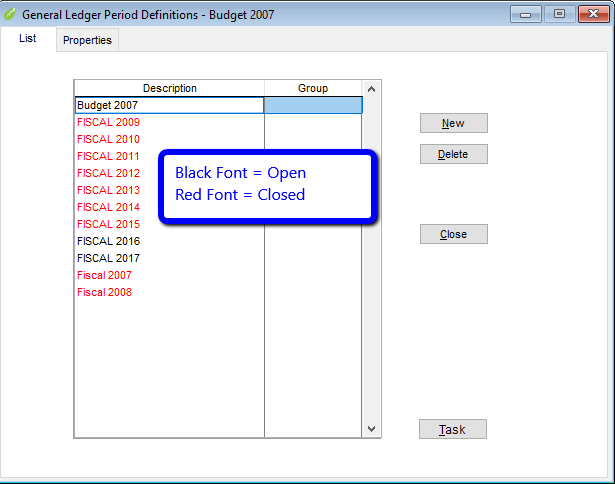
Both fiscal and budget periods are setup in this component. The period may be the usual 12 month year or a lesser number of months.
- Select New to enter a period. View moves to Properties tab.
- Double click on an existing line to view or edit a period. View moves to Properties tab.
The properties tab is where you enter information about a new period or edit an existing one.
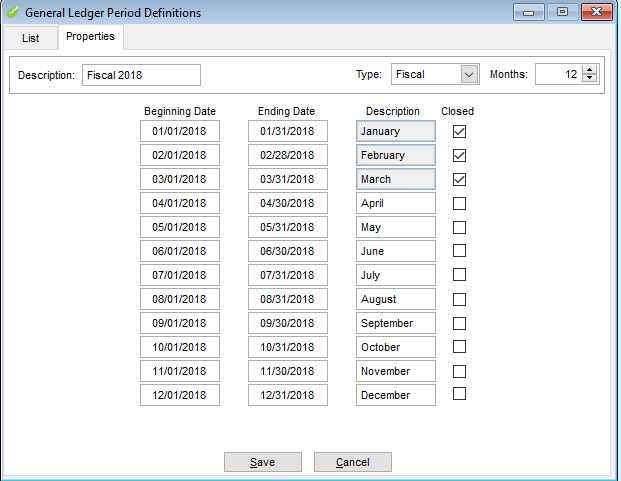
- Enter Description (up to 15 alphanumeric characters) used on financial reports.
- Group
- Select Fiscal or Budget from drop down menu for Type.
- Enter the beginning date of the fiscal or budget year. System will fill in other dates and default monthly descriptions. Descriptions may be changed.
- The Closed column boxes may be used to temporarily close a month. Click on the box and check mark indicates the month is closed. This prevents any Dsys32 module from entering data in the checked as closed. A warning will appear if someone attempts to enter data with a closed monthly date. The boxes may be unchecked at any time, to allow entry.
- Click Save to return to List tab.
- Click Close to exit.
Related Articles