Replace Item Defaults
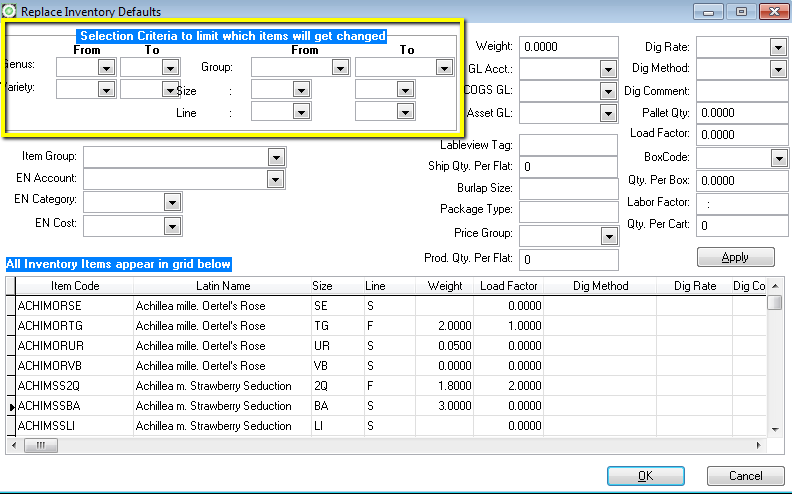
In most cases, inventory item defaults may be the same for similar items. For example, all 2-gallon azaleas, regardless of variety, may weigh 4 lbs or have the same load factor. The Replace Item Defaults Utility is used to quickly change the weight, load factor, dig method, dig rate, and dig comment, pallet quantity or LabelView tag color.
To replace item defaults, enter the new values and press the Replace button, located in the upper right corner of the screen. To replace defaults for specific items, such as only 2 gallon items, enter a size code in the ‘From’ and ‘To’ fields, enter the new value in any or all of the attribute fields. Click Apply.
When you click apply, the value (if changed) of every field is updated on every item matching the selection criteria (area inside yellow box).
 |
| Utilites - Replace Item Defaults |
|---|
The Item Code, Description and Size columns are searchable by clicking into the column and typing characters for which to search.
Only the first four defaults are shown on the screen. Scroll to the right or left by using the scroll arrows to show other default fields. Every field that is available for change is in the grid. You do not have to click Apply to make your changes. You can manually enter values directly into the grid and click OK.
- Related Articles:
- Inventory
- Inventory Cost Basis
- Price Levels
- Load Factor